AD Password-Reset GUI tool using Powershell
A GUI tool helps in resetting the password for AD accounts.
AD password-Reset is an application that helps in resetting the LDAP password under diverse situations.
- Once the user opens the application, all the fields will be graded out except the user name and the Get Data button. After entering the username and clicking on the Get Data option, all the respective fields will be filled and buttons will be activated based on the data fetched from the Active Directory.

Based on the criteria and the data fetched from the AD, the respective buttons get activated. For example,
- If the account is locked the unlock button is activated
If the account is disabled, the enable button is activated.
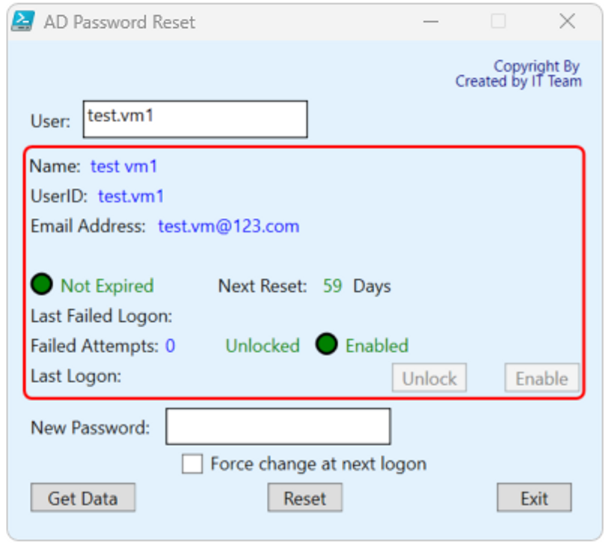
Let us visualize how each function works.
What if the account gets locked?
If the account gets locked, the Unlock button is activated. Please note that Locked text will be shown in red.
Once the user clicks on the Unlock button, the account gets unlocked and the user will get the status of the account by turning the Unlocked indicator to green color.
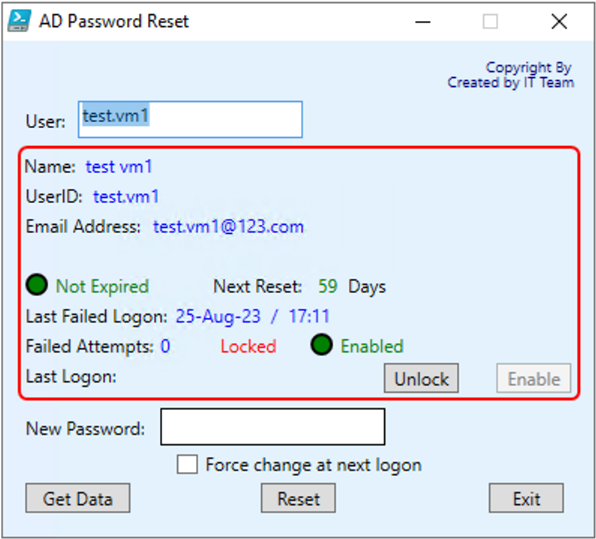
Visualizing Account Status
What if the account expires?
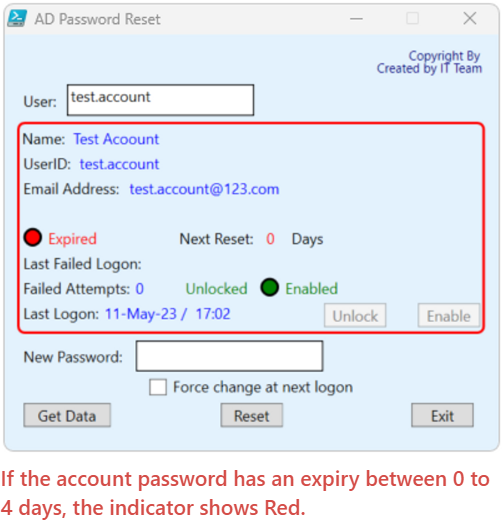
If the account expires, the color indicator will be in red which describes the account’s health that is the account is expired.
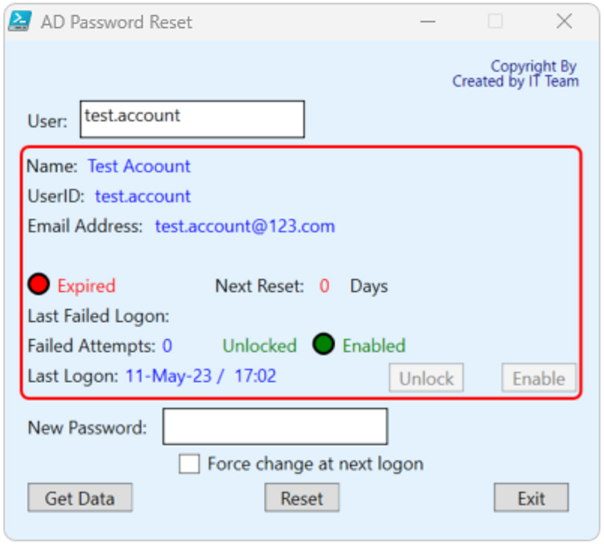
How to change the password?
Generate a random password and enter the same in the New Password Field. Now click on the Reset button.
Enabling Force change at the next logon check box. This feature will let the user force change the password at the next login.
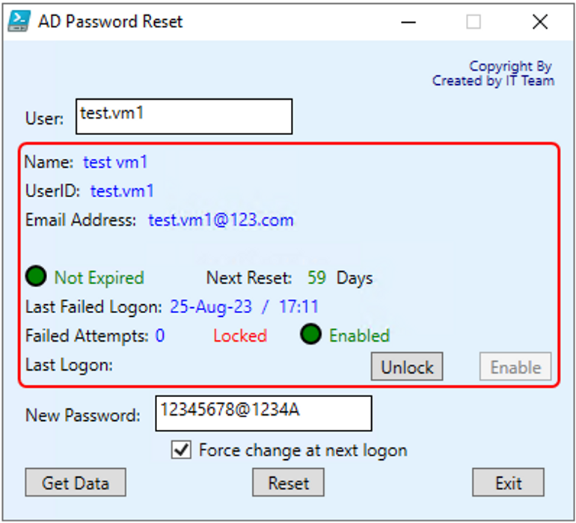
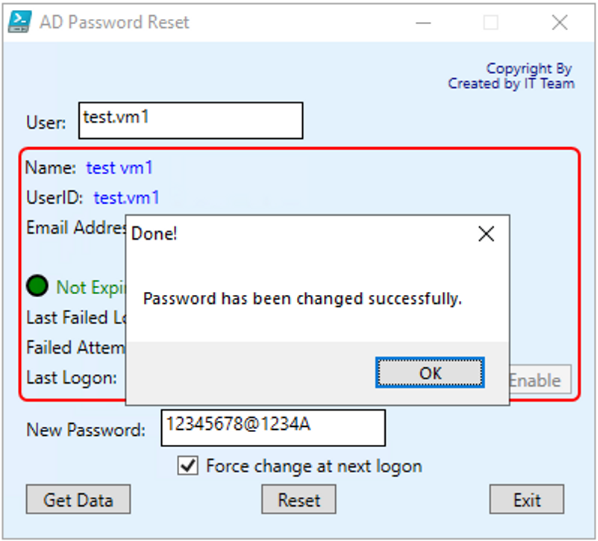
Once the password is successfully changed a dialogue box will appear stating
The password has been changed successfully
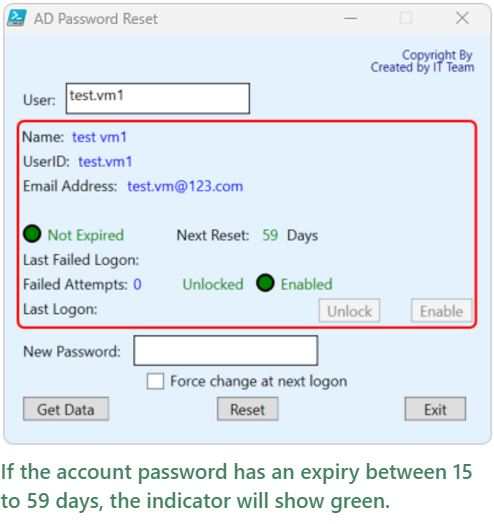
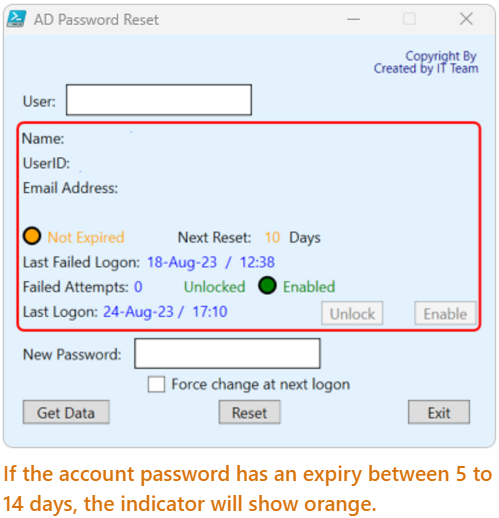
AD Account Password Health Indicators.
If you want to make any modification to the Code based on your preference you can do it at the line
1
<Label Name="toolVersionRevisionTxt" Content="Copyright By " HorizontalAlignment="Right" Margin="0,5,10,5" VerticalAlignment="Top" FontSize="10" Foreground="#000080"/>
And
1
2
<Label Name="creatorTxt" Content="Created by IT Team" HorizontalAlignment="Right" Margin="0,15,8,0" VerticalAlignment="Top" FontSize="10" Foreground="#000080"/>
    <Label Name="UserNameLbl" Content="User:" VerticalAlignment="Top" HorizontalAlignment="Left" Margin="10,40,0,0" Foreground="Black" />
To change the background color you can use the below line
1
Title="AD Password Reset" Height="360.000" Width="400.000" Foreground="#FF161ED4" Background
Complete Powershell Script
1
2
3
4
5
6
7
8
9
10
11
12
13
14
15
16
17
18
19
20
21
22
23
24
25
26
27
28
29
30
31
32
33
34
35
36
37
38
39
40
41
42
43
44
45
46
47
48
49
50
51
52
53
54
55
56
57
58
59
60
61
62
63
64
65
66
67
68
69
70
71
72
73
74
75
76
77
78
79
80
81
82
83
84
85
86
87
88
89
90
91
92
93
94
95
96
97
98
99
100
101
102
103
104
105
106
107
108
109
110
111
112
113
114
115
116
117
118
119
120
121
122
123
124
125
126
127
128
129
130
131
132
133
134
135
136
137
138
139
140
141
142
143
144
145
146
147
148
149
150
151
152
153
154
155
156
157
158
159
160
161
162
163
164
165
166
167
168
169
170
171
172
173
174
175
176
177
178
179
180
181
182
183
184
185
186
187
188
189
190
191
192
193
194
195
196
197
198
199
200
201
202
203
204
205
206
207
208
209
210
211
212
213
214
215
216
217
218
219
220
221
222
223
224
225
226
227
228
229
230
231
232
233
234
235
236
237
238
239
240
241
242
243
244
245
246
247
248
249
250
251
252
253
254
255
256
257
258
259
260
261
262
263
264
265
266
267
268
269
270
271
272
273
274
275
276
277
278
279
280
281
282
283
284
285
286
287
288
289
290
291
292
293
294
295
296
297
298
299
300
301
302
303
304
305
306
307
308
309
310
311
312
313
314
315
316
317
318
319
320
321
322
323
324
325
326
327
328
329
330
331
332
333
334
335
336
337
338
339
340
341
342
343
344
345
346
347
348
349
350
351
352
353
354
355
356
357
358
359
360
361
362
363
364
365
366
367
368
369
370
371
372
373
374
375
376
377
378
379
380
381
Set-ExecutionPolicy Bypass -Scope Process -Force
[void][System.Reflection.Assembly]::LoadWithPartialName('presentationframework')
Add-Type -Assembly System.Windows.Forms

[xml]$XAML = @'
<Window x:Name="ADPwordReset"
    xmlns="http://schemas.microsoft.com/winfx/2006/xaml/presentation"
    xmlns:x="http://schemas.microsoft.com/winfx/2006/xaml"
    Title="AD Password Reset" Height="360.000" Width="400.000" Foreground="#FF161ED4" Background="#E3F2FD"
    ResizeMode="CanMinimize"
    FocusManager.FocusedElement="{Binding ElementName=UserNameTextBox}">
    <Grid Margin="0,0,0,-131">

    <Button Name="btnUnlock" Content="Unlock" VerticalAlignment="Top" HorizontalAlignment="right" Margin="0,215,90,0" Width="50" IsEnabled="False" ToolTip="Click to unlock user account." />
    <Button Name="btnEnable" Content="Enable" VerticalAlignment="Top" HorizontalAlignment="right" Margin="0,215,15,0" Width="50" IsEnabled="False" ToolTip="Click to unlock user account." />
    <Button Name="btnGetData" Content="Get Data" VerticalAlignment="Top" HorizontalAlignment="Left" Margin="15,295,0,0" Width="70" />
    <Button Name="btnReset" Content="Reset" VerticalAlignment="Top" HorizontalAlignment="Center" Margin="0,295,0,0" Width="50" IsEnabled="False" />
    <Button Name="btnExit" Content="Exit" VerticalAlignment="Top" HorizontalAlignment="right" Margin="0,295,20,0" Width="50" />

    <Label Name="toolVersionRevisionTxt" Content="Copyright By" HorizontalAlignment="Right" Margin="0,5,10,5" VerticalAlignment="Top" FontSize="10" Foreground="#000080"/>
    <Label Name="creatorTxt" Content="Created by IT Team" HorizontalAlignment="Right" Margin="0,15,8,0" VerticalAlignment="Top" FontSize="10" Foreground="#000080"/>
    <Label Name="UserNameLbl" Content="User:" VerticalAlignment="Top" HorizontalAlignment="Left" Margin="10,40,0,0" Foreground="Black" />
    <TextBox Name="UserNameTextBox" HorizontalAlignment="Left" Height="25" Margin="50,40,0,0" TextWrapping="Wrap" VerticalAlignment="Top" Width="150" BorderBrush="Black" Background="White"/>

    <Border Name="UserDataBdr" BorderBrush="Red" BorderThickness="2" HorizontalAlignment="Left" Height="170" Margin="10,70,0,0" VerticalAlignment="Top" Width="375" CornerRadius="5"/>
    <Label Name="FullNameFieldLbl" Content="Name:" VerticalAlignment="Top" HorizontalAlignment="Left" Margin="9,70,0,0" Foreground="Black" />
    <Label Name="FullNameLbl" Content="" VerticalAlignment="Top" HorizontalAlignment="Left" Margin="50,70,0,0" Foreground="Blue" />

    <Label Name="UserIDFieldLbl" Content="UserID:" VerticalAlignment="Top" HorizontalAlignment="Left" Margin="10,90,0,0" Foreground="Black" />
    <Label Name="UserIDLbl" Content="" VerticalAlignment="Top" HorizontalAlignment="Left" Margin="55,90,0,0" Foreground="Blue" />
    <Label Name="EmailAddressLbl" Content="Email Address:" VerticalAlignment="Top" HorizontalAlignment="Left" Margin="10,110,0,0" Foreground="Black" />
    <Label Name="EmailLbl" Content="" VerticalAlignment="Top" HorizontalAlignment="Left" Margin="95,110,0,0" Foreground="Blue" />


    <Ellipse Name="ExpiredStpLt" VerticalAlignment="Top" HorizontalAlignment="Left" Margin="15,155,0,0" Fill="LightGray" Height="15" Width="15" StrokeThickness="2" Stroke="Black" ToolTip="User's password has expired." />
    <Label Name="ExpiredLbl" Content="Expired" VerticalAlignment="Top" HorizontalAlignment="Left" Margin="30,150,0,0" Foreground="LightGray" />
    <Label Name="ResetCountFieldLbl" Content="Next Reset:" VerticalAlignment="Top" HorizontalAlignment="Left" Margin="135,150,0,0" Foreground="Black" />
    <Label Name="ResetCountLbl" Content="0" VerticalAlignment="Top" HorizontalAlignment="Left" Margin="205,150,0,0" Foreground="Blue" />
    <Label Name="ResetCountUnitsLbl" Content="Days" VerticalAlignment="Top" HorizontalAlignment="Left" Margin="225,150,0,0" Foreground="Black" />
    <Label Name="LastFailedLogonFieldLbl" Content="Last Failed Logon:" VerticalAlignment="Top" HorizontalAlignment="Left" Margin="10,170,0,0" Foreground="Black" />
    <Label Name="LastFailedLogonLbl" Content="" VerticalAlignment="Top" HorizontalAlignment="Left" Margin="110,170,0,0" Foreground="Blue" />
    <Label Name="FailedAttemptsFieldLbl" Content="Failed Attempts:" VerticalAlignment="Top" HorizontalAlignment="Left" Margin="10,190,0,0" Foreground="Black" />
    <Label Name="FailedAttemptsLbl" Content="0" VerticalAlignment="Top" HorizontalAlignment="Left" Margin="100,190,0,0" Foreground="Blue" />
    <Label Name="LockedLbl" Content=" Locked" VerticalAlignment="Top" HorizontalAlignment="Left" Margin="140,190,0,0" Foreground="LightGray" />
    <Ellipse Name="EnabledStpLt" VerticalAlignment="Top" HorizontalAlignment="Left" Margin="205,195,0,0" Fill="LightGray" Height="15" Width="15" StrokeThickness="2" Stroke="Black" ToolTip="User account has been disabled." />
    <Label Name="EnabledLbl" Content="Disabled" VerticalAlignment="Top" HorizontalAlignment="Left" Margin="220,190,0,0" Foreground="LightGray" />
    <Label Name="LastLogonFieldLbl" Content="Last Logon:" VerticalAlignment="Top" HorizontalAlignment="Left" Margin="10,210,0,0" Foreground="Black" />
    <Label Name="LastLogonLbl" Content="" VerticalAlignment="Top" HorizontalAlignment="Left" Margin="75,210,0,0" Foreground="Blue" />

    <Label Name="NewPasswordLbl" Content="New Password:" VerticalAlignment="Top" HorizontalAlignment="Left" Margin="10,245,0,0" Foreground="Black" />
    <TextBox Name="NewPasswordTextBox" HorizontalAlignment="Left" Height="25" Margin="105,245,0,0" TextWrapping="Wrap" VerticalAlignment="Top" Width="150" BorderBrush="Black" Background="DarkGray" IsEnabled="False" />

    <CheckBox Name="ForceChangeCheckbox" Content="Force change at next logon" IsEnabled="False" Margin="115,275,0,0" HorizontalAlignment="Left" VerticalAlignment="Top" Foreground="LightGray" ToolTip="Check this box to force user to change their password at next logon." />

    </Grid>
</Window>
'@

# Read XAML
$reader=(New-Object System.Xml.XmlNodeReader $xaml)
try{$Form=[Windows.Markup.XamlReader]::Load($reader)}
catch{Write-Host "Unable to load Windows.Markup.XamlReader.  Some possible causes for this problem include:  .NET Framework is missing.  PowerShell must be launched with PowerShell -sta. Invalid XAML code was encournted.":exit}

#============================================
# Store From Objects in PowerShell
#============================================
$xaml.SelectNodes("//*[@Name]") | %{Set-Variable -Name ($_.Name) -Value $Form.FindName($_.Name)}

#============================================
# Add events to Form Objects
#============================================
$btnUnlock.Add_Click({UnlockADAccount})
$btnEnable.Add_Click({EnableADAccount})
$btnGetData.Add_Click({GetADUserData})
$btnReset.Add_Click({SetADPassword})
$btnExit.Add_Click({$Form.Close()})
$UserNameTextBox.Add_KeyDown({if ($Args[1].key -eq 'Return') {GetADUserData}})

#============================================
# Global Parameters
#============================================
[string] $global:targetUser = ""
[array] $global:UserData = @()
[boolean] $global:forceReset = $false
[boolean] $global:disabledAD = $false
[array] $global:UserFieldLbls = @($FullNameLbl,$ExtensionLbl,$UserIDLbl,$EnabledLbl,$EmailLbl,
                                $ExpiredLbl,$ResetCountLbl,$LastFailedLogonLbl,$FailedAttemptsLbl,
                                $LockedLbl,$LastLogonLbl)
[array] $global:StopLgts = @($EnabledStpLt,$ExpiredStpLt)
[int] $global:PasswordLife = 60

#============================================
# Reset Focus Function - reset's focus to User Name text box
#============================================
function Reset-Focus {
    $UserNameTextBox.Focus()
    $UserNameTextBox.SelectAll()

    Return
}

#============================================
# Reset form Function - reset's the form to starting defaults
#============================================
function Reset-Form {
    # blank all the user data labels
    ForEach ($label in $UserFieldLbls) {
        $label.Content = ""
    }

    # reset all the stoplights to default
    ForEach ($light in $StopLgts) {
        $light.Fill = "LightGray"
    }

    # disable reset functions
    $btnReset.IsEnabled = $false
    $ForceChangeCheckbox.IsEnabled = $false
    $ForceChangeCheckbox.Foreground = "LightGray"
    $NewPasswordTextBox.IsEnabled = $false
    $NewPasswordTextBox.Background = "DarkGray"

    Return
}

#============================================
# Unlock AD account function
#============================================

Function UnlockADAccount {
    $user = $targetUser
    Unlock-ADAccount -Identity $user

    GetADUserData
}

#============================================
# Enable AD account function
#============================================

Function EnableADAccount {
    $user = $targetUser
    Enable-ADAccount -Identity $user

    GetADUserData
}

#============================================
# reset form after password reset and unable
# force change at next logon
#============================================
Function UnableToForce {
    # send the pop-up
    $wshell = New-Object -ComObject Wscript.Shell
    $wshell.Popup("This password does not expire.  Unable to force change at next logon.",0,"Done!",0x0)

    $NewPasswordTextBox.Text = ""
    $ForceChangeCheckbox.IsChecked = $false
    $ForceChangeCheckbox.IsEnabled = $false

    Return
}

#============================================
# reset form after password reset
#============================================
Function PasswordSet {
    # send the pop-up
    $wshell = New-Object -ComObject Wscript.Shell
    $wshell.Popup("Password has been changed successfully.",0,"Done!",0x0)

    $NewPasswordTextBox.Text = ""
    $ForceChangeCheckbox.IsChecked = $false

    Return
}

#============================================
# reset AD user account password
#============================================

Function SetADPassword {
    $password = $NewPasswordTextBox.Text.ToString()

    Set-ADAccountPassword -Identity $targetUser -Reset -NewPassword (ConvertTo-SecureString -AsPlainText $password -Force)

    If ($($ForceChangeCheckbox.IsChecked))
    {
        Set-ADUser -Identity $targetUser -ChangePasswordAtLogon $true
    } Else
    {
        Set-ADUser -Identity $targetUser -ChangePasswordAtLogon $false
    }

    If ($($userData.PasswordNeverExpires))
    {
        UnableToForce
    } Else
    {
        PasswordSet
    }

    Reset-Focus

    Return
}

#============================================
# reset form if bad or no username
#============================================
Function NoUser {

    Reset-Form

    # send the pop-up
    $wshell = New-Object -ComObject Wscript.Shell
    $wshell.Popup("Could not find the specified user: $targetUser.",0,"Oops!",0x0)

    Return
}

#============================================
# Output AD user data to Form
#============================================
Function FormatUserData {
    # local function parameter reset
    $lastLogon = ""
    $lastFail = ""
    $expiresOn = ""
    $resetDays = 0

    # Password day and date calculations
    $lastLogon = '{0:dd-MMM-yy /  HH:mm}' -f $($UserData.LastLogonDate)
    $lastFail = '{0:dd-MMM-yy  /  HH:mm}' -f $($UserData.LastBadPasswordAttempt)
    $today = Get-Date # today's date
    $expiresOn = $($UserData.PasswordLastSet).AddDays($PasswordLife)
    $resetDays = $($expiresOn - $today).Days

    # Fill-in-the-Blanks
    $FullNameLbl.Content = $UserData.Name
    #$ExtensionLbl.Content = $UserData.telephoneNumber
    $UserIDLbl.Content = $UserData.SamAccountName
    $EmailLbl.Content = $UserData.EmailAddress
    #$DeptLbl.Content = $UserData.Department
    #$TitleLbl.Content = $UserData.Title
    #Sowmya
    $LastLogonLbl.Content = $lastLogon
    $LastFailedLogonLbl.Content = $lastFail
    $FailedAttemptsLbl = $UserData.badPwdCount

    # Color-coding the Output and allow for password reset
    if ($($UserData.Enabled))
    {
        $EnabledStpLt.Fill = "Green"
        $EnabledLbl.Content = "Enabled"
        $EnabledLbl.Foreground = "Green"
        If ($disabledAD)
        {
            $btnEnable.IsEnabled = $false
        } Else
        {
            Out-Null
        }

        # enable reset functions
        $btnReset.IsEnabled = $true
        $ForceChangeCheckbox.IsEnabled = $true
        $ForceChangeCheckbox.Foreground = "Black"
        $NewPasswordTextBox.IsEnabled = $true
        $NewPasswordTextBox.Background = "White"

    } Else
    {
        $EnabledStpLt.Fill = "Red"
        $EnabledLbl.Content = "Disabled"
        $EnabledLbl.Foreground = "Red"
        If ($disabledAD)
        {
            $btnEnable.IsEnabled = $true
        } Else
        {
            Out-Null
        }

        # disable reset functions
        $btnReset.IsEnabled = $false
        $ForceChangeCheckbox.IsEnabled = $false
        $ForceChangeCheckbox.Foreground = "LightGray"
        $NewPasswordTextBox.IsEnabled = $false
        $NewPasswordTextBox.Background = "DarkGray"
    }

    If ($($UserData.PasswordNeverExpires))
    {
        $resetDaysColor = "Green"
        $ExpiredStpLt.Fill = "Orange"
        $resetDays = 0
        $ExpiredLbl.Content = "Never Expires"
        $ExpiredLbl.Foreground = "Orange"
        $ExpiredStpLt.ToolTip = "This password never expires.  Not best practice..."
    } Else
    {
        $resetDaysColor = Switch ($resetDays) {
            {$_ -lt 0} {"Red"}
            {$_ -ge 0 -and $_ -le 4} {"Red"}
            {$_ -ge 5 -and $_ -le 14} {"Orange"}
            {$_ -ge 15} {"Green"}
        }
        $ExpiredLbl.Foreground = $resetDaysColor
        $ExpiredStpLt.Fill = $resetDaysColor

        If ($resetDays -le 0)
        {
            $ExpiredLbl.Content = "Expired"
            $resetDays = 0
            $ExpiredStpLt.ToolTip = "This password has expired."
        } Else
        {
            $ExpiredLbl.Content = "Not Expired"
            $ExpiredStpLt.ToolTip = "This password is still good."
        }
    }

    If ($($userData.LockedOut))
    {
        $LockedLbl.Content = "Locked"
        $LockedLbl.Foreground = "Red"
        $btnUnlock.IsEnabled = $true
    } Else
    {
        $LockedLbl.Content = "Unlocked"
        $LockedLbl.Foreground = "Green"
        $btnUnlock.IsEnabled = $false
    }

    $ResetCountLbl.Content = $resetDays
    $ResetCountLbl.Foreground = $resetDaysColor

}

#============================================
# get AD user data
#============================================

Function GetADUserData {
    # Parameters
    $global:targetUser = $UserNameTextBox.Text.ToString()
    $global:UserData = @()
    $userProperties = @("Name","SamAccountName","Enabled","EmailAddress","badPwdCount",
                         "LastBadPasswordAttempt","LastLogonDate","PasswordExpired",
                        "PasswordLastSet","PasswordNeverExpires","LockedOut")

    # Pull Active Directory user data
    $global:UserData = Get-ADUser -Identity $targetUser -Properties * | Select $userProperties

    If ($($UserData.Length) -gt 0)
    {
        FormatUserData
    } Else
    {
        NoUser
    }

    Reset-Focus

    Return
}

#============================================
# Shows the form
#============================================
$Form.ShowDialog() | out-null

<#
_________                                ________    _________
\______   \_____ ___  _______    ____    /  _____/   /   _____/
 |     ___/\__  \\  \/ /\__  \  /    \  /   \  ___   \_____  \
 |    |     / __ \\   /  / __ \|   |  \ \    \_\  \  /        \
 |____|    (____  /\_/  (____  /___|  /  \______  / /_______  /
                \/           \/     \/          \/          \/
#>